


Skip to content

Agile testing with Jira

Agile testing with
SquashTM and Jira

Have you adopted agile working practices? Do you need a solution to manage your tests? Opt for SquashTM!

SquashTM is interfaced with Jira, the reference tool for agile teams. The link is made through the Xsquash plugin, to enable you to manage tests in agile teams.

See SquashTM + Jira in action

Watch our demo of the Xsquash plugin.

Watch the demo video
How does it work?

Xsquash provides interfacing between SquashTM and Jira in order to manage Agile projects

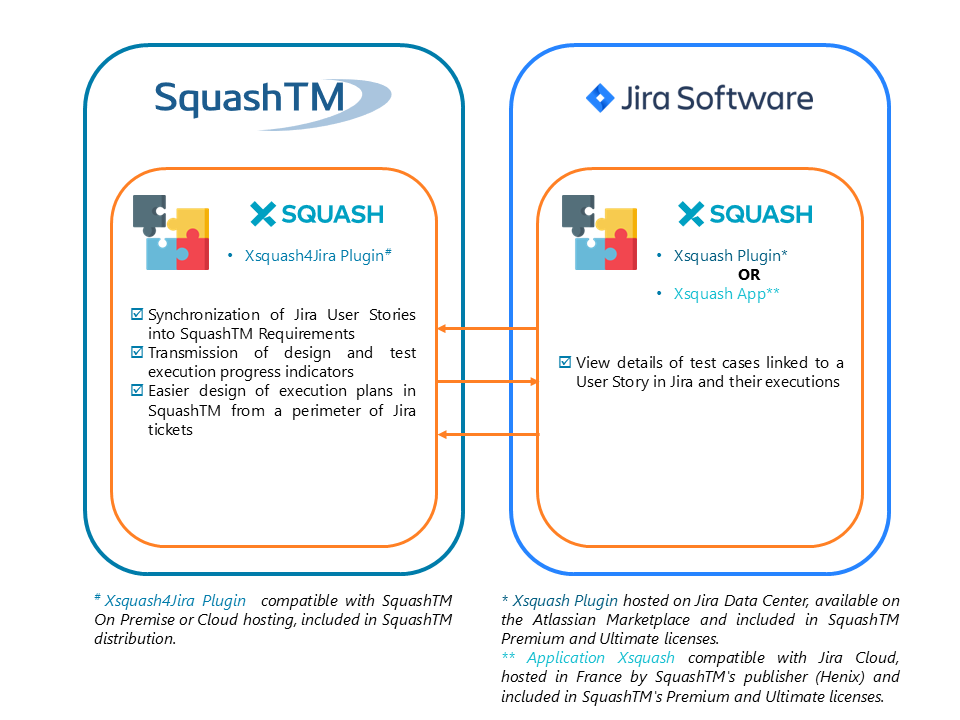
Xsquash has two components:

  • A SquashTM plugin: Xsquash4Jira (compatible with Jira Data Center and Cloud)
  • A Jira component, whose nature depends on the Jira host (Data Center or Cloud): Xsquash plugin for Jira Data Center, or Xsquash application for Jira Cloud
Xsquash components: the Xsquash4Jira plugin on the SquashTM side (User Story synchronisation, progress indicators, execution plan design) and the Xsquash plugin or app on the Jira side (details of test cases and their executions)
01

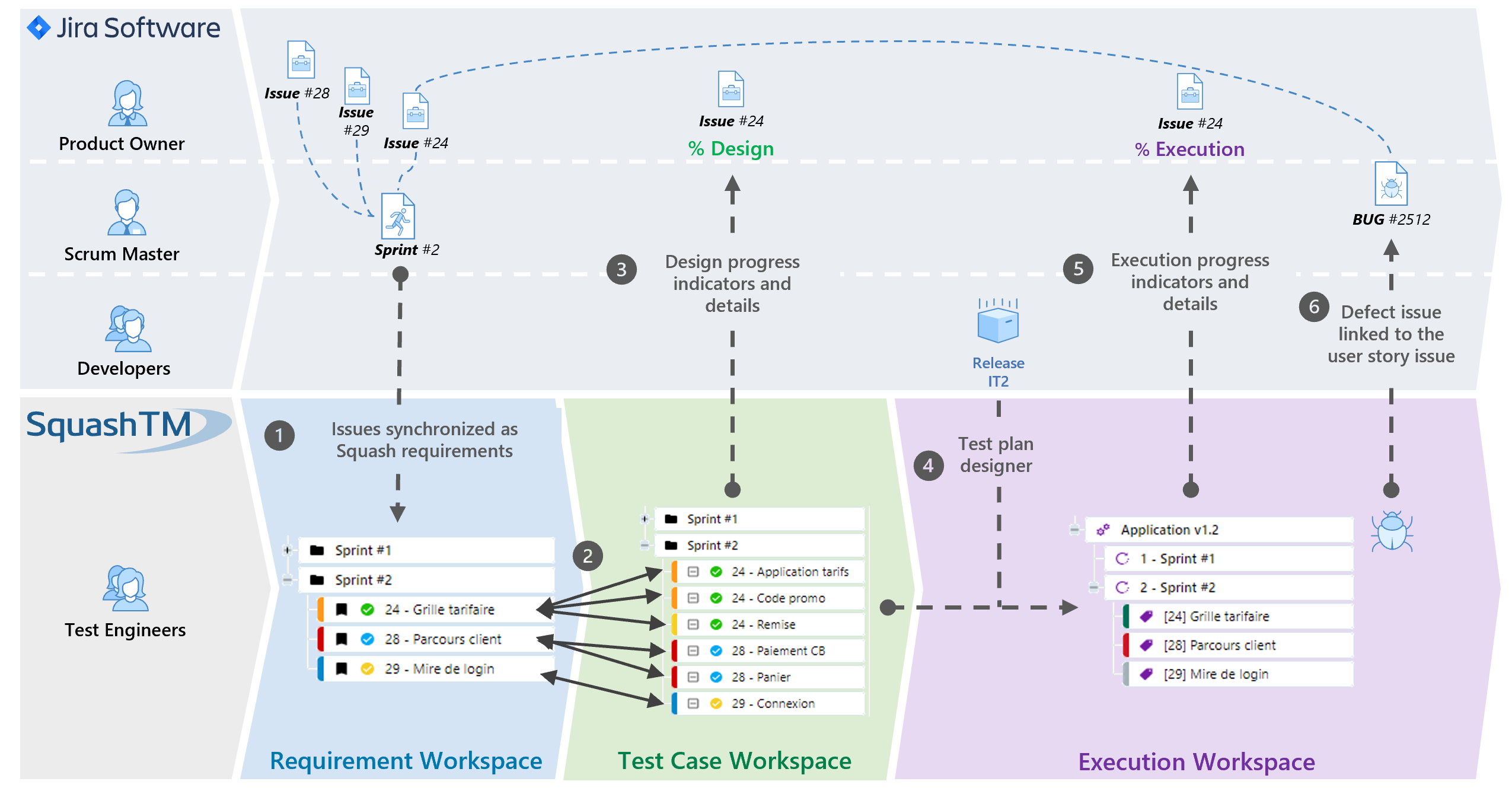
Synchronisation of User Stories in Jira with requirements in SquashTM

  • The Product Owner defines needs by writing epics and User Stories in Jira. These agile elements can then be synchronised into SquashTM to be displayed as requirements.
  • You set the Jira scope you want to synchronise, whether it is every issue from a specific project, issues from the active sprint only, or User-Story-and-task issues only, etc. The selected elements will then be automatically synchronised.
  • If you work with sprints as part of a Scrum Jira project, your requirements will be organised into sprint folders in the SquashTM Requirements workspace.
02

Test writing in SquashTM (acceptance criteria, test cases written in Gherkin language, action/result test cases)

  • Once the User Story is written, acceptance criteria will be directly set in SquashTM with a collaborative approach: the tester, who has business knowledge, contributes to requirement definition to provide the maximum added value to the identified feature.
  • These scenarios can be automated and thus executed for each sprint, or each new release, to cover a broad scope of regression tests.
  • Amongst other possibilities, you can link classic action/result test cases to User Stories to complete your test scope, or you can design end-to-end tests.
03

Test design feedback in Jira

  • Once Gherkin or action/result test cases are designed and linked to synchronised requirements, the Product Owner, the Scrum Master or developers will be able to track design and execution progress for every Jira test-related issue.
  • Summarised indicators are recovered into Jira, as well as the details of tests related to a Jira issue and details of their executions (test content, datasets, execution steps...).
04

Simplified design of the execution plan in SquashTM

  • Before test execution, the tester can easily design the execution plan. A wizard in SquashTM Campaign workspace allows identifying every test to be executed in order to cover a specific Jira scope (one/several sprint(s)/release(s) or according to a JQL query).
  • Automated tests will be automatically executed. For other kinds of test, you will be able to execute them manually regardless of their format (Gherkin or classic action/result tests). Results and details of executions will be directly displayed in Jira to allow the Product Owner, the Scrum Master or developers to track software quality.
05

Test execution in SquashTM, feedback about test execution in Jira, and link between reported defects and tested User Stories

  • If a test failed, the tester will be able to directly report a defect from SquashTM. It will be pre-populated with all the data from the execution process in order for it to be easily replicable and to make discussions easier.
  • The defect will be linked to the SquashTM test case and to the tested Jira issue.

This feature is not included in Xsquash plugin, but in TM_BT.JIRA plugin (included in Premium and Ultimate licences).

Why SquashTM?

Xsquash enables seamless integration between SquashTM and Jira, without changing your working habits.

Jira remains the tool to design your needs (epics, User Stories...), sprints and releases. SquashTM is the tool to optimise your test asset management. SquashTM helps you to adopt best practices in terms of testing activities from the beginning of your project. We aim for an easy transition to the maintenance phase, while considering methodological and organizational change if need be. For instance: transition from Scrum to Kanban, transition to external QA, turn over...

A relevant and scalable solution for your projects and company needs.

Tests, executions, and test-related data are managed by SquashTM: system workload does not depend upon your Jira instance. This enables company-scale implementations. The SquashTM implementation is simplified by the fact that SquashTM is customizable to various methodologies (Agile, Waterfall), various project phases (initial development, evolutions, maintenance), various kinds of tests (acceptance tests, functional tests, non-regression tests, end-to-end tests…), with or without automation.

Test automation to keep the pace of agile cycles.

Short development cycles and repeated deliveries are an integral part of agile development. Test automation enables you to deeply and frequently execute non-regression tests to focus test efforts on the latest developed features. With SquashTM, you will be able to automate your tests with the technology and the approach of your choice (keyword-driven approach with Cucumber and Robot Framework, with JUnit native code or with commercial studios such as UFT and Ranorex). Once your test is automated, you can run an automated execution from SquashTM or from your CI/CD. Execution results are directly displayed in SquashTM and shared into Jira.

Manage your agile tests with SquashTM and Jira

Talk to a SquashTM expert to connect SquashTM to your Jira instance, Data Center or Cloud.

Talk to an expert