Skip to content

SquashTM-GitLab platform

Testing with the
SquashTM-GitLab platform

The power of SquashTM & GitLab integration.

Try the integration for free!

Access our online demo to test the SquashTM-GitLab platform's test-oriented features.

Online demo

Everything you need to know about the SquashTM-GitLab integration

From the requirements repository to deployment: each step of the GitLab cycle and the SquashTM workspace that supports it.
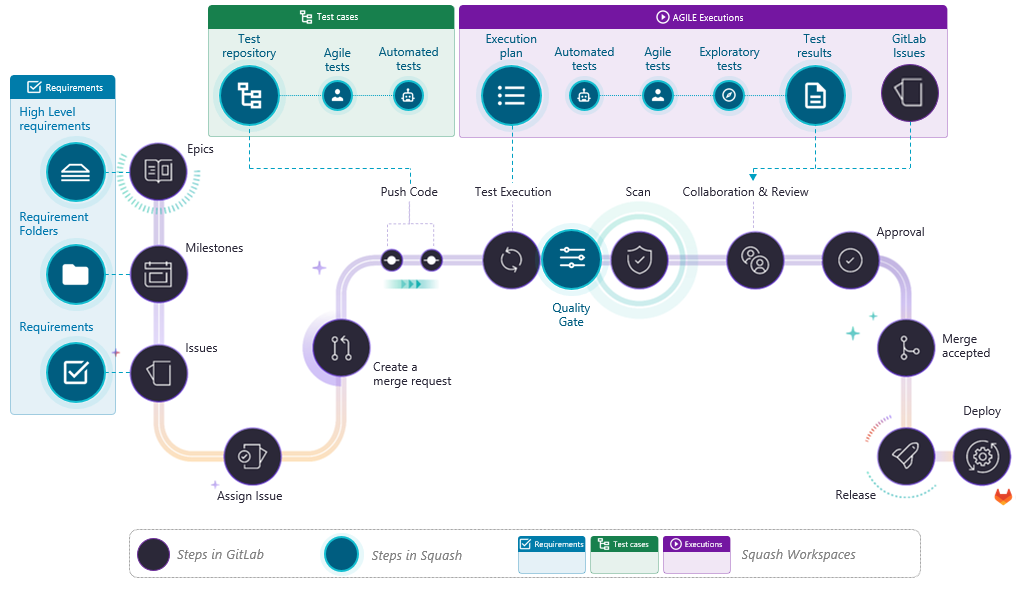
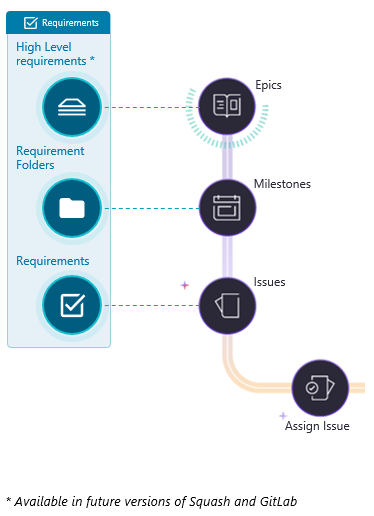
Diagram of the SquashTM-GitLab platform: GitLab steps (Epics, Milestones, Issues, merge request, test execution, quality gate, scan, review, approval, merge, release, deploy) linked to the SquashTM Requirements, Test cases and Executions workspaces
  1. 01 Synchronise GitLab objects in the requirements repository
  2. 02 Design your functional tests
  3. 03 Plan test execution
  4. 04 Run functional tests
GitLab Epics, Milestones and Issues synchronised with SquashTM high level requirements, requirement folders and requirements
01

Synchronise GitLab objects in the requirements repository

  • Map GitLab Epics*, Milestones, Iterations and Issues to SquashTM test requirements — speeds up tests definition by using already synchronised test requirements
  • Ensure full traceability of GitLab Issues — associate test cases to synchronised requirements

* Available in future versions of SquashTM and GitLab
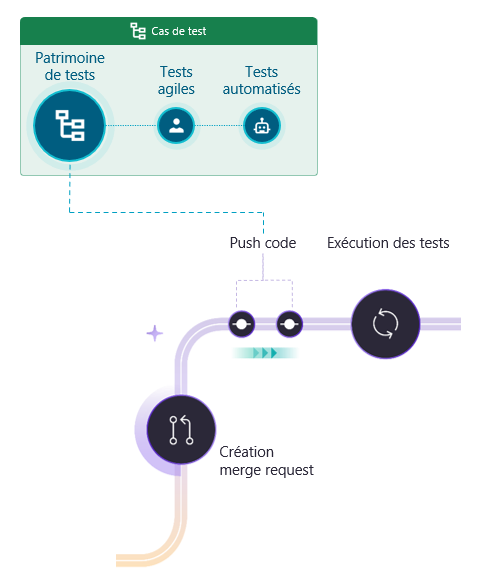
SquashTM test repository, agile and automated tests linked to the GitLab code push and merge request
02

Design your functional tests

  • Describe your manual and automated tests — for a homogeneous test repository
  • Generate Cucumber and Robot Framework scripts for BDD test cases — enables guaranteeing the match of functional automated tests to their specifications
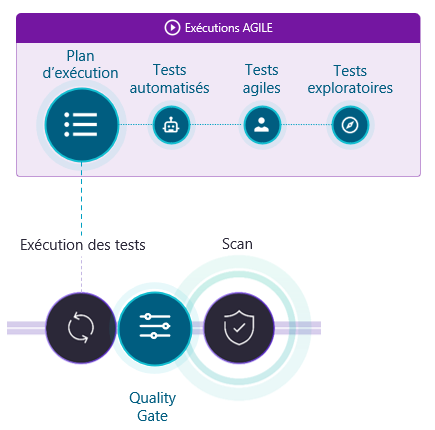
The SquashTM execution plan triggering test execution and the quality gate in the GitLab pipeline
03

Plan test execution

  • Tailor manual and automated test plans using wizards — easy identification of test cases to cover a scope of Issues, Iterations or Milestones
  • Integrate automated test execution in the CI/CD pipeline
  • Define and customise a quality gate for the CI/CD pipeline — complement your security scans and enable you to focus on critical, relevant tests and results, regardless of flaky tests
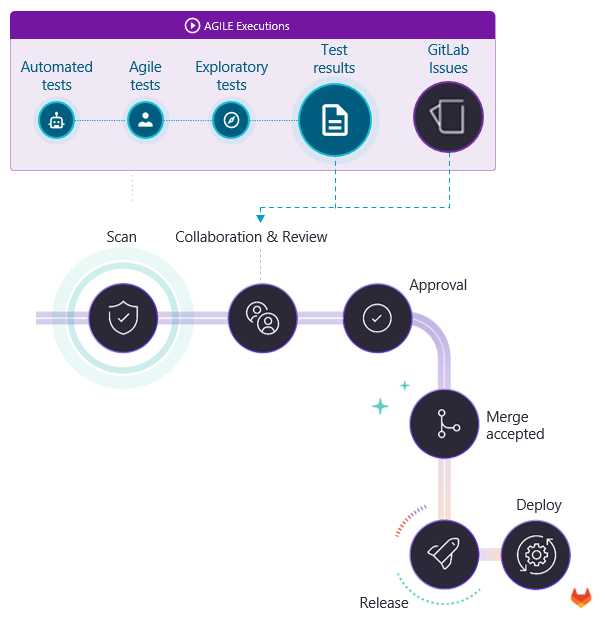
Test results and GitLab Issues feeding review, approval, merge, release and deployment
04

Run functional tests

  • Access test results, reports and quality gate in GitLab — secure go-live by giving stakeholders the full picture
  • Report in the merge requests the functional quality gate outcome — prevents the merge of functionally app-breaking code increments
  • Declaration of anomalies right from SquashTM as GitLab Issues — allows QA to create templated Issues automatically pre-filled with test data to facilitate communication with the dev team
  • Link detected issues to the original Issues* — the release management has a full picture for the go/no-go of the feature

* Available in future versions of SquashTM and GitLab
Test-oriented features of the platform

User stories

Synchronisation of GitLab user stories as requirements in SquashTM and reporting of indicators in these US

Test details and results

Access to test details and results in GitLab (available with the future release of GitLab custom Work Items)

Test assets

Reference in SquashTM of the automated test assets stored in GitLab

Epics

Synchronisation of GitLab epics in SquashTM and reporting of indicators in these epics (in future versions)

Anomalies

Declaring pre-populated anomalies with test data from SquashTM in GitLab

Quality gate

Launch of a test plan from CI/CD and definition of pipeline continuation/stopping criteria (quality gate) according to test results

Execution plans

Design of execution plans in SquashTM from a scope of user stories

Automation

Management of test automation using a workflow, association of scripts to test cases and generation of Robot Framework or Cucumber scripts for BDD test cases

CI/CD reports

Access to test results and reports and to the quality gate result in CI/CD

Ready to connect SquashTM and GitLab?

Talk to a SquashTM expert to set up the SquashTM-GitLab platform in your context.

Talk to an expert